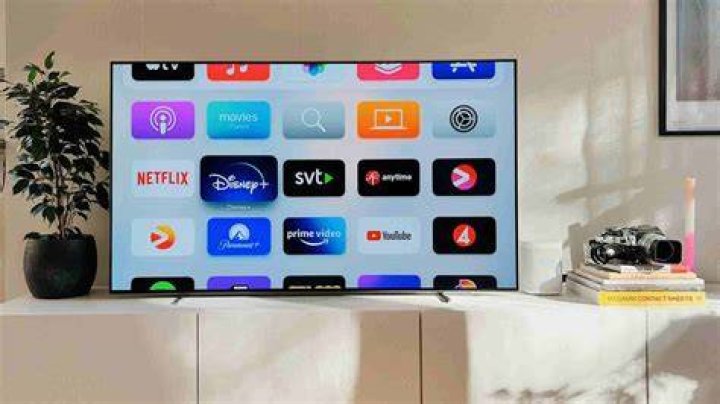
Apple TV: Everything You Need to Know About Apple's Streaming Platform
 Nathan Sanders
 Apple TV has evolved from a simple set-top box into a comprehensive entertainment ecosystem that spans hardware, software, and streaming services. Whether you're considering the physical device or the subscription service, understanding what Apple offers can help you decide if it fits your viewing habits and budget.
The name itself creates confusion. Apple TV refers to both a streaming device that connects to your television and Apple TV+, the company's subscription streaming service. There's also the Apple TV app, which works across multiple platforms including smart TVs, gaming consoles, and mobile devices. This guide breaks down each component.
The Apple TV Device: Hardware Options
Apple currently sells two main hardware models. The Apple TV 4K comes in two configurations, while the company discontinued the HD model in 2022. The latest 4K version, released in 2022, features the A15 Bionic chip—the same processor found in iPhone 13 models.
The base model includes 64GB of storage and supports Wi-Fi connectivity. The upgraded version offers 128GB storage, adds Ethernet connectivity, and includes Thread support for smart home integration. Both models support Dolby Vision, HDR10+, and Dolby Atmos, delivering premium picture and sound quality when paired with compatible displays and audio systems.
Pricing starts at $129 for the 64GB model and $149 for the 128GB version. That's significantly higher than competing streaming devices from Roku, Amazon, or Google, which often cost under $50. Apple positions its device as a premium option with superior performance and integration within its ecosystem.
Apple TV+ Streaming Service
Launched in November 2019, Apple TV+ represents the company's entry into original content production. Unlike Netflix or Disney+, which rely heavily on extensive back catalogs, Apple focuses exclusively on original programming. The service has built a reputation for quality over quantity.
Notable productions include "Ted Lasso," which won multiple Emmy awards, "The Morning Show" featuring Jennifer Aniston and Reese Witherspoon, "Severance," "Foundation," and "For All Mankind." The library has grown substantially since launch but remains smaller than established competitors.
The monthly subscription costs $9.99, making it one of the more affordable streaming options. Apple also bundles the service with Apple One subscriptions, which combine Apple Music, iCloud storage, Apple Arcade, and other services at discounted rates. Anyone who purchases an Apple device receives three months of Apple TV+ free.
How the Apple TV App Works
The Apple TV app serves as a content aggregation hub. It's available on Apple devices, smart TVs from Samsung, LG, Sony, and Vizio, Roku and Fire TV streaming devices, PlayStation and Xbox gaming consoles, and through web browsers.
Inside the app, you'll find content from Apple TV+, iTunes purchases and rentals, and integration with other streaming services. The app attempts to create a unified interface where you can search across multiple platforms without jumping between different apps. When you search for a show, it displays which services offer that content and whether it requires an additional subscription.
The app also includes Apple TV Channels, which lets you subscribe to services like Paramount+, Showtime, or Starz directly through Apple rather than signing up separately. This consolidates billing but doesn't always offer the best pricing compared to subscribing directly.
Content Library and Offerings
Apple TV+ produces content across multiple genres: drama, comedy, documentary, children's programming, and films. The service releases episodes weekly for most series rather than dropping entire seasons at once, a strategy that generates ongoing discussion and maintains subscriber engagement.
Recent additions include sports programming. Apple secured exclusive rights to Major League Soccer matches through 2032, marking a significant shift in strategy. Friday Night Baseball also streams on the platform, bringing live sports content that was previously absent.
The children's content section features shows based on popular properties and original series designed for younger audiences. Parents appreciate the ad-free environment and the absence of mature content accidentally appearing in kids' profiles.
Film production has accelerated. Apple releases theatrical films from major directors including Martin Scorsese's "Killers of the Flower Moon" and Ridley Scott's "Napoleon." These films receive limited theatrical releases before streaming on the platform, giving Apple credibility in the film industry.
Device Features and Capabilities
The physical Apple TV device functions as more than a streaming box. It serves as a HomeKit hub, controlling smart home devices even when you're away from home. It plays Apple Arcade games, turning your television into a casual gaming console when paired with compatible controllers.
The Siri Remote, redesigned in 2021, replaced the heavily criticized touchpad-only design. The new version includes physical buttons, a clickpad that also functions as a directional pad, and dedicated power and mute buttons that control your TV and soundbar through HDMI-CEC.
AirPlay support lets you wirelessly stream content from iPhones, iPads, and Macs directly to your television. Photos, videos, music, and even screen mirroring work seamlessly. SharePlay enables synchronized viewing with friends and family in different locations, complete with shared playback controls.
The device supports multiple user profiles. Each person gets personalized recommendations, separate watch history, and individual access to their own streaming service subscriptions. Kids' profiles include parental controls and content restrictions.
Comparing Apple TV to Competitors
| Feature | Apple TV 4K | Roku Ultra | Fire TV Cube | Chromecast with Google TV |
|---|---|---|---|---|
| Price | $129-149 | $99 | $139 | $49 |
| 4K/HDR Support | Yes | Yes | Yes | Yes |
| Voice Assistant | Siri | Roku Voice | Alexa | Google Assistant |
| Smart Home Hub | Yes (HomeKit) | No | Yes (Alexa) | Limited |
| Gaming Support | Apple Arcade | Limited | Limited | Limited |
| Storage | 64GB/128GB | N/A (streaming only) | 16GB | 8GB |
The comparison reveals Apple's positioning. It costs more but offers capabilities beyond streaming. For users deeply invested in Apple's ecosystem—owning iPhones, iPads, Macs, and HomeKit devices—the integration justifies the premium. For casual streamers who simply want access to Netflix and Hulu, cheaper alternatives provide similar streaming quality.
Who Should Choose Apple TV
Apple TV makes sense for specific users. If you own multiple Apple devices, the seamless integration across your ecosystem creates convenience that competitors can't match. AirPlay works flawlessly, iCloud photo libraries display on your TV automatically, and purchased content from iTunes transfers across all devices.
Smart home enthusiasts using HomeKit benefit from the built-in hub functionality. The device maintains your automations and scenes even when your iPhone isn't home. Thread support future-proofs your setup for the next generation of smart home devices.
Quality-focused viewers who prioritize performance over price appreciate the powerful processor, consistent interface, and lack of advertisements cluttering the home screen. Unlike some competitors that feature ads prominently, Apple TV's interface focuses on content discovery.
Families value the robust parental controls, multiple user profiles, and SharePlay features. The ability to share subscriptions across family members through Family Sharing reduces costs when everyone needs access to the same content.
Limitations to Consider
The high upfront cost remains the primary barrier. Budget-conscious shoppers can find capable 4K streaming devices for a quarter of the price. While Apple TV performs better, the difference may not matter to users who primarily watch standard streaming services.
Apple TV+ has a limited content library compared to Netflix, Disney+, or HBO Max. The focus on quality produces excellent shows, but subscribers seeking variety may find the options insufficient. The lack of a robust back catalog means less content for binge-watching.
Some streaming services offer limited functionality on Apple TV compared to other platforms. Certain apps don't support all features available on native smart TV apps or competing streaming devices. Compatibility issues occasionally arise with specific apps or services.
The device lacks expandable storage. While 64GB or 128GB seems sufficient for streaming, users who download numerous games or large video files may find limitations. Once storage fills, you'll need to delete content before adding more.
Tips for Getting the Most Value
Consider Apple One bundles if you use multiple Apple services. The Premier plan includes Apple TV+, Apple Music, Apple Arcade, Apple News+, Apple Fitness+, and 2TB of iCloud storage for $32.95 monthly. Individual subscriptions would cost significantly more.
Take advantage of free trial offers. New device purchases include three months of Apple TV+. Some credit cards and mobile carriers include Apple TV+ as a free benefit. Check your existing subscriptions before paying separately.
Use the Apple TV app on existing devices before buying the hardware. If you own a recent smart TV or streaming device, install the app to access Apple TV+ and purchased content. This tests whether you need the physical device or if the app suffices.
Wait for sales events. Apple rarely discounts directly, but retailers offer deals during Black Friday, Prime Day, and back-to-school promotions. You can often save $20-30 on the device during these periods.
Subscribe to services through Apple TV Channels only when it offers convenience worth the potential cost difference. Sometimes subscribing directly through the service's website costs less or includes additional benefits not available through Apple's integration.
The Future of Apple TV
Apple continues investing heavily in original content. The company reportedly spends over $6 billion annually on programming, approaching Netflix's content budget. This commitment suggests the library will expand significantly over coming years.
Sports content appears central to future strategy. Beyond MLS and MLB, industry observers speculate Apple may pursue additional sports rights as existing contracts with traditional broadcasters expire. Live sports drive subscriber acquisition and reduce cancellations.
The hardware may see updates incorporating newer processors and additional smart home protocols. Matter support, the industry-standard smart home protocol, could make Apple TV an even more capable hub for connected devices across brands.
Integration with Vision Pro, Apple's spatial computing headset launched in 2024, creates new possibilities. The company may develop immersive viewing experiences that blend traditional content with augmented reality elements, though mainstream adoption remains years away.
Making Your Decision
Apple TV works best when it complements an existing Apple ecosystem. The hardware delivers excellent performance, the streaming service produces high-quality original content, and the app provides convenient access across devices. The premium pricing reflects Apple's positioning as a luxury brand.
For casual streamers with limited budgets, more affordable alternatives deliver similar core streaming functionality. For Apple enthusiasts, smart home users, and quality-focused viewers willing to pay for premium experiences, Apple TV offers compelling advantages that justify the higher cost.
Evaluate your specific needs. Do you own other Apple devices? Do you control smart home devices through HomeKit? Do you value performance and interface quality over price? Your answers determine whether Apple TV represents the right choice for your entertainment setup.
