Duck Keyboard That Quacks: The Novelty Peripheral Making Waves Online
 Jackson Reed
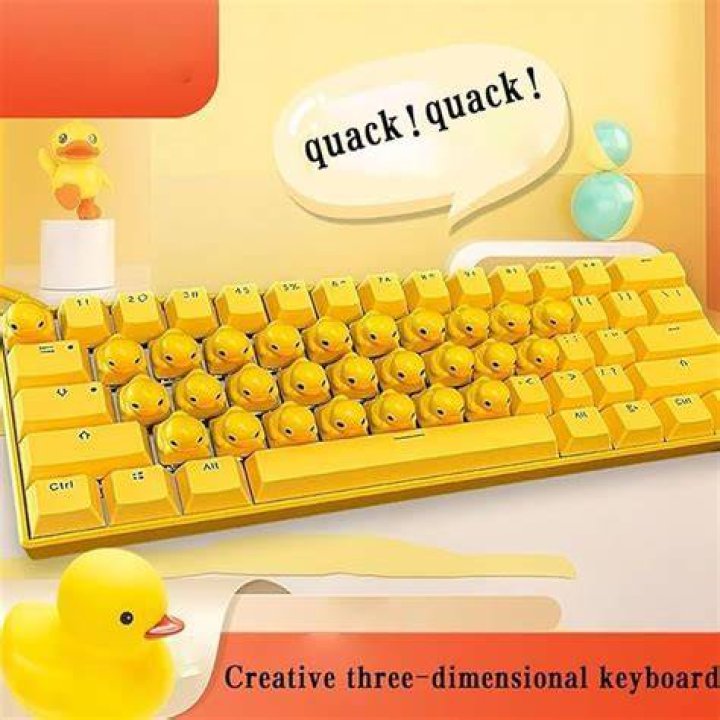
A peculiar typing companion has waddled its way into the mechanical keyboard community, and it's making noise—literally. The duck keyboard that quacks replaces traditional keystroke sounds with authentic duck quacks, transforming mundane typing sessions into something unexpectedly delightful. What started as a novelty concept has evolved into a genuine product category, with several manufacturers now producing these avian-themed peripherals for enthusiasts who want their workspace to stand out.
These keyboards aren't just gimmicks slapped together for viral videos. Many feature legitimate mechanical switches, customizable RGB lighting, and surprisingly decent build quality. The quacking sound comes from built-in speakers that trigger with each keypress, mimicking various duck vocalizations from soft peeps to full-throated quacks. Some models even include different duck species sounds, letting users switch between mallard quacks, wood duck squeals, and rubber ducky squeaks.
What Makes a Duck Keyboard Quack
The technology behind these keyboards is straightforward yet effective. Most duck keyboards that quack use small embedded speakers paired with a sound chip containing pre-recorded duck audio samples. When you press a key, the mechanical switch sends two signals—one to your computer registering the keystroke, and another to the sound module triggering a quack.
Higher-end models incorporate sound randomization algorithms, preventing the exact same quack from playing repeatedly. This creates a more natural, varied audio experience that doesn't become grating after extended use. Volume controls let users adjust the quack intensity from barely audible to office-disrupting levels, though most people find a moderate setting works best for daily use.
The mechanical switches themselves typically fall into standard categories: clicky blues, tactile browns, or linear reds. The quacking sound is completely separate from the physical switch noise, meaning you experience both the mechanical feedback you'd expect from a quality keyboard and the bonus duck audio layered on top.
Popular Duck Keyboard Models
Several manufacturers have jumped into this niche market. The "Quacktical Pro" from a Chinese manufacturer called YUNZII gained traction on social media platforms in late 2024, featuring 68 keys, hot-swappable switches, and five different duck sound profiles. It retails for around $89 and includes software that lets users assign specific quack types to individual keys.
Another notable entry is the "Ducky Quacker" keyboard—yes, the name is intentionally confusing given that Ducky is already an established keyboard brand. This particular model costs roughly $65 and targets budget-conscious buyers who want the quacking experience without premium features. Reviews suggest adequate performance for casual typing and gaming, though the build quality doesn't match higher-tier mechanical keyboards.
Custom keyboard builders have also embraced the trend. Enthusiasts on forums like Reddit's r/MechanicalKeyboards share DIY modifications adding quack modules to existing boards. These projects typically involve Arduino microcontrollers, small speakers, and creative wiring solutions. The community aspect has helped sustain interest beyond the initial novelty factor.
Why People Actually Buy These Keyboards
The obvious answer is humor. A keyboard that quacks is inherently funny, especially during video calls when colleagues suddenly hear barnyard sounds during a serious presentation. But the appeal goes deeper than simple pranks.
Many users report that the unusual auditory feedback makes typing more engaging. The human brain responds positively to novel stimuli, and hearing duck sounds instead of standard clicks can make mundane tasks like writing emails feel less tedious. Some people find the quacks oddly satisfying, similar to how ASMR triggers work for certain individuals.
Streamers and content creators have adopted duck keyboards as part of their on-screen persona. The distinctive sound becomes a recognizable audio signature, differentiating their content from countless other streams. Viewers often request demonstrations or react positively to the quacking during broadcasts, creating organic engagement opportunities.
Parents buying keyboards for children's computers appreciate how the silly sounds make learning to type more enjoyable. Kids show increased enthusiasm for homework and educational games when each keystroke produces an animal noise. Educational psychology supports this—adding playful elements to learning tasks improves motivation and retention for younger students.
Practical Considerations Before Purchasing
Not every environment suits a duck keyboard. Open office plans present obvious challenges. Unless your coworkers share your enthusiasm for waterfowl sounds, you'll likely need to disable the quacking feature or face complaints to HR. Home offices work better, provided family members tolerate the noise.
Battery life matters for wireless models. The speaker system drains power faster than standard Bluetooth keyboards, with most lasting 20-40 hours of active use before requiring a recharge. Wired versions eliminate this concern but sacrifice desk aesthetics with an additional cable.
Latency is generally not an issue. Even budget duck keyboards maintain response times under 10 milliseconds, perfectly adequate for gaming and professional typing. The quack sound might arrive a fraction of a second after the keystroke registers, but this delay doesn't affect actual typing performance.
Durability varies significantly between manufacturers. Cheaper models sometimes experience speaker failures after a few months, leaving you with a regular keyboard that no longer quacks. Reading user reviews and checking warranty terms helps avoid disappointment. Premium models typically use better components that withstand extended use.
Customization and Software Options
Advanced duck keyboards include companion software with surprising depth. Users can upload custom sound files, replacing quacks with any audio clip under two seconds long. This transforms the keyboard into a general-purpose sound effect board. Some people program movie quotes, game sounds, or musical notes instead of duck noises.
Key-specific programming lets you assign different sounds to different keys. Imagine the spacebar quacking, vowels honking, and consonants peeping. The software typically supports multiple profiles, letting you switch between sound schemes for different moods or applications.
RGB lighting synchronization with quacks adds visual flair. Keys can flash specific colors when they quack, creating multisensory feedback. Gaming profiles might assign urgent quacks and red lighting to important keybinds, while productivity modes use gentler sounds with calming blue hues.
The Broader Novelty Keyboard Market
Duck keyboards represent just one branch of an expanding novelty peripheral ecosystem. Manufacturers have released keyboards that bark, meow, chirp, and make retro video game sounds. The success of quacking keyboards proved demand exists for typing devices that prioritize entertainment alongside functionality.
This trend reflects changing attitudes toward workplace aesthetics and personal expression. Younger professionals feel less bound by traditional office norms, viewing their desk setup as an extension of personality rather than a purely utilitarian workspace. A duck keyboard signals you don't take yourself too seriously and value fun in daily routines.
The market remains niche but stable. Sales data from peripheral retailers show consistent interest rather than a sharp spike and decline typical of pure fad products. This suggests duck keyboards have found a sustainable audience beyond early adopters chasing the next weird thing.
Frequently Asked Questions
Can you turn off the quacking sounds?
Yes, virtually all duck keyboards include a mute switch or button combination that disables the quacking while maintaining normal keyboard functionality. This lets you use the same keyboard in quiet environments like libraries or during late-night sessions when others are sleeping. Some models remember your volume preference across power cycles, while cheaper versions reset to default settings.
Do duck keyboards work with Mac and PC?
Most duck keyboards connect via USB and function as standard HID devices, meaning they're compatible with Windows, macOS, and Linux without special drivers. The quacking mechanism operates independently of the operating system. However, advanced customization software may only be available for Windows, limiting Mac users to basic sound controls through hardware buttons on the keyboard itself.
How loud are the quacks compared to mechanical switch clicks?
The quack volume is adjustable, but at default settings, it's typically louder than standard mechanical switch sounds—roughly equivalent to 60-70 decibels at arm's length, similar to normal conversation volume. Clicky blue switches produce around 50-55 decibels. Maximum quack volume can reach 75-80 decibels, approaching the sound level of a vacuum cleaner. Minimum settings make the quacks barely audible, just above switch noise.
Where to Buy Duck Keyboards
Amazon carries multiple duck keyboard models from various manufacturers, with prices ranging from $45 to $120 depending on features and build quality. AliExpress offers cheaper alternatives, often $10-20 less expensive, though shipping times from international warehouses can extend several weeks.
Specialty mechanical keyboard retailers like MechanicalKeyboards.com occasionally stock novelty models, though selection varies. These vendors typically offer better customer service and return policies than marketplace sellers. Checking enthusiast forums helps identify current stock levels and which sellers are reputable.
Custom keyboard group buys sometimes include quack modules as add-ons. These limited runs produce higher-quality products than mass-market options but require patience—group buys often take months from order to delivery as manufacturers produce small batches.
Final Thoughts
The duck keyboard that quacks occupies a strange intersection between legitimate peripheral and desktop toy. It's silly, absolutely. But it's also functional, surprisingly well-made in many cases, and genuinely enjoyable for the right person. Whether it's worth the investment depends entirely on how much value you place on making everyday computing more amusing.
For streamers, content creators, or anyone who spends hours typing and wants to inject personality into their setup, these keyboards deliver. They're conversation starters during video calls and might even make tedious tasks slightly less tedious. Just maybe check with your coworkers first before bringing one to the office. Your typing speed won't improve, but you'll definitely quack yourself up.